Optimizing Facebook Ads: How to Improve Underperforming Campaigns
Now that you've analyzed your ad and know your ROAS, here are your next steps. Remember to be mindful of the Facebook Ads Learning Phase when making changes.
1. Turn it off
ROAS < 0.9x
2. Tweak the ad idea
ROAS 0.9x - 1.4x
3. Scale it
ROAS 1.5x+
If you waited to do your ROAS analysis after a 14 day "catch-up" period and it is still under 0.9x, turn it off and move on. There are a lot of ideas in the world; better spend your time testing new ones.
If it is 1.5x+, scale that puppy. We'll cover that in the next lesson.
If it is 0.9x - 1.4x ROAS, we have this "room for improvement" zone. I'm really happy with a 1.3x ROAS. But if the ROAS is that low it won't scale super well and it's worth testing some small changes.
Iterating
Here are your options for iterating on an ad idea. The first thing you should do is evaluate if it is a Facebook (CPC) or Amazon (conversion rate) problem.
Amazon Problem
If you have a really strong CPC, or one that is in-line with your other top performers, you have an Amazon Problem.
1. Make sure you have optimized your Amazon page.
Follow the AdSync guide for the gold standard Amazon descriptions, titles, and A+ content.
Make sure your book cover is good, all of the things you hear as a beginning marketer.
2. Your ad might be engagement bait.
It might be great at appealing to the masses and inducing a click, but it's not speaking to your targeted readers the most.
If you have an ad that lists the book title, its price, tropes, etc., all things that mean a ton of information has been transferred already, you likely don't have this problem. People who click on an ad like this are high-intent.
But you might have a generic ad with a really cool visual that is highly engaging but people don't know anything about the book when they click. This will lower your conversion rate. You're not actually sending good traffic to Amazon.
If you test a new image that does this, Facebook will update its algorithm to hone in on the qualified user. And that's the key point here, you will be better off with a higher CPC if it means there is more signal for Facebook to find high-intent readers.
Facebook Problem
If you have a high CPC because of a high CPM or low CTR, try these things:
1. Tweaking the Creative
- Add/improve the CTA or offer.
- CTA (Call to Action): Instructions telling the user what to do next, like "Read Now" or "Get it on Amazon".
- Ad Offer: What you are giving them, e.g. "Free on KU" or "0.99 for a limited time".
- Tweak small parts of the ad image.
- Try a different model/person/prop if that is part of your ad.
- Try a different color text.
- Rearrange components of the ad (CTA at the top instead of the bottom).
2. Tweaking the Text
Given you have added multiple texts/headlines, Facebook will show you how each is performing. AdSync makes this much easier to view.
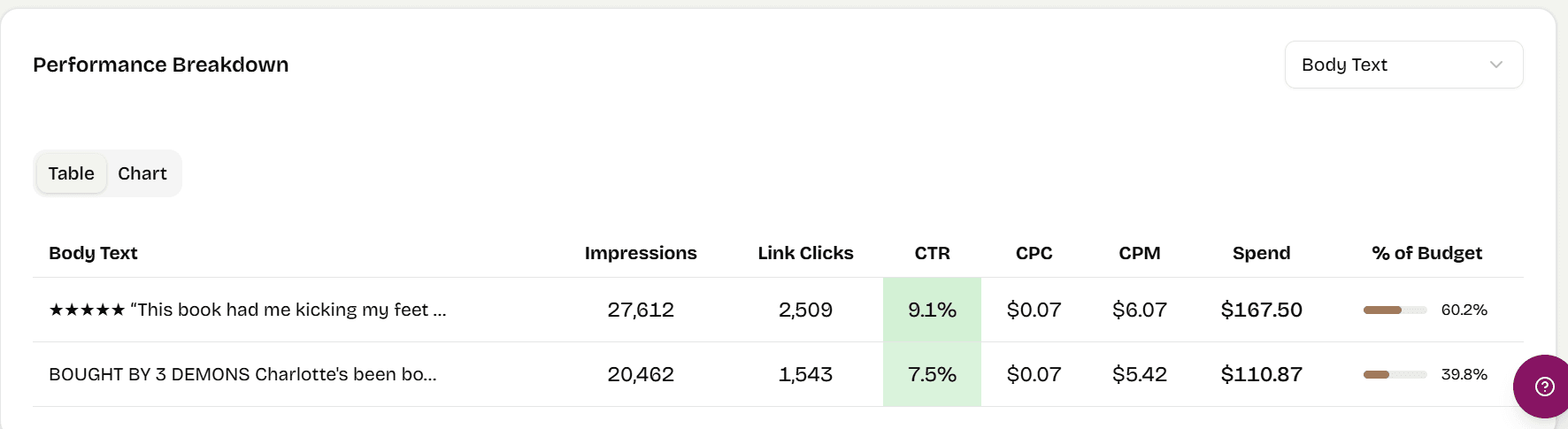
- Delete the bad ones.
- Look at the ones doing well and try to improve on them.
Here's the catch on optimizing the ad copy.
I found that at lower spend amounts, Facebook will only use 1 of the variations you give it.
So when you test ads you should occasionally introduce a new variant of a primary text or headline and make it the only option so you force Facebook to test it.
- If this ad is a new variant, test an already working one.
- If this ad is using a time-tested one, try a new one.
3. Tweaking Audience Settings
This is really only possible if you're using a manual ad campaign. In Advantage+, Facebook won't give you control over age groups, genders, and placement.
I found Facebook is not always good at picking the right one. Males perform terribly for romance books I advertise, yet Meta will find a way to get a low CPC for them (they will not convert on Amazon). And I've had problems with them showing "Blank" headlines.
Read more about the perils of trusting the algo here.
Look at the Facebook stats, CPC and CTR in AdSync and see if you can get any insights here.
Implementing Your Changes
If you are changing an ad, especially the ad creative, I recommend duplicating the ad in Facebook, adding a new amazon attribution link, and turning off the old ad.
There are two reasons:
Facebook Lag
Sometimes I make changes to ad settings and I find Facebook goes right on showing the old ad. I can only PROVE they are doing this with the ad copy, text and headlines, because they show me impressions for each of those. So I'm fairly suspicious of it potentially happening with the images too.
Keeping your data straight
This is actually the main reason.
If you re-use the amazon attribution link, the ROAS of the old and new version will intermingle. Now your analysis is confusing. You're back to being ROAS blind.
"Did my changes improve ROAS or are users from the old ad just continuing to purchase things on Amazon (this assumes you're within the 14 day window)?"