The Simple Guide to Facebook Advertising for Authors
The simplistic guide to Facebook advertising for authors that still covers everything you need to know.
Introduction
There are a lot of conflicting pieces of advice out there about what a good ad looks like. People will sell you templates and freelancing ideas, claiming they'll make you thousands of dollars. Always be skeptical of those promises.
The truth is, an ad format or special Facebook campaign structure may have worked for someone else, but every book is different. Your genre, reviews, author brand, timing, book cover, and more can drastically change your results compared to theirs.
Don't fall for the "one-size-fits-all" ad template trap. What works for a romance author might fail completely for a thriller writer. Your audience, genre conventions, and book positioning all play a role in ad success.
The best advice I can give you is to source ideas from a variety of places and test many ads with a small budget until you find the ones that work for your books.
Here's the simple, step-by-step process for testing ad creative fast and effectively.
As you test, review AdSync's combined ad analytics to compare Meta spend with Amazon results. Check whether each return calculation uses retail sales or estimated royalties before making a budget decision.
Step 1: Create Your Ad Creative (or 10 of Them)
This is one of the two most critical steps in running Facebook ads. In today's digital landscape, stopping someone's scroll is almost all that matters when running an ad.
It's also one of the most intimidating parts for new advertisers. Everyone always asks, "Well, how do I create my ad?"
There are two parts to this process.
Part 1: Getting Ideas for Your Ads
The creative concept is where it all begins. Here are four proven places to source ad ideas:
1. Meta Ad Library
This is a goldmine. The Meta Ad Library is a searchable collection of all ads currently running on Facebook. Look up successful authors in your genre to see what their ads look like. Pay attention to the images they use, the copy style, and the calls-to-action.
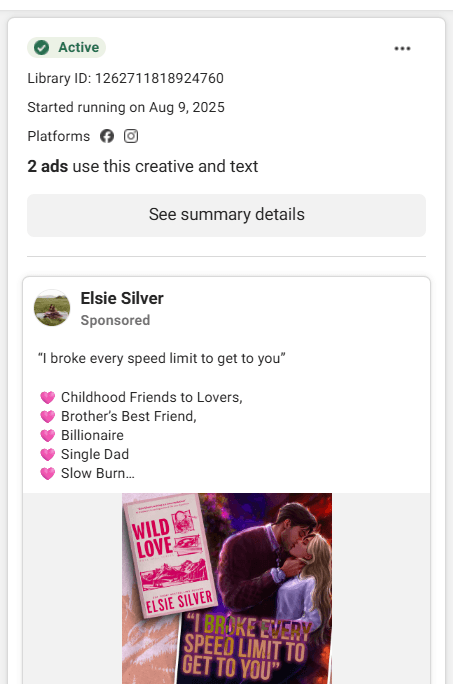
You can access it at facebook.com/ads/library.
2. Screenshot Ads You See in Your Feed
Start paying attention to the ads that make YOU stop scrolling. Take screenshots and save them in a folder. Over time, you'll build a swipe file of inspiration. Note what caught your attention; was it the image? The headline? The offer?
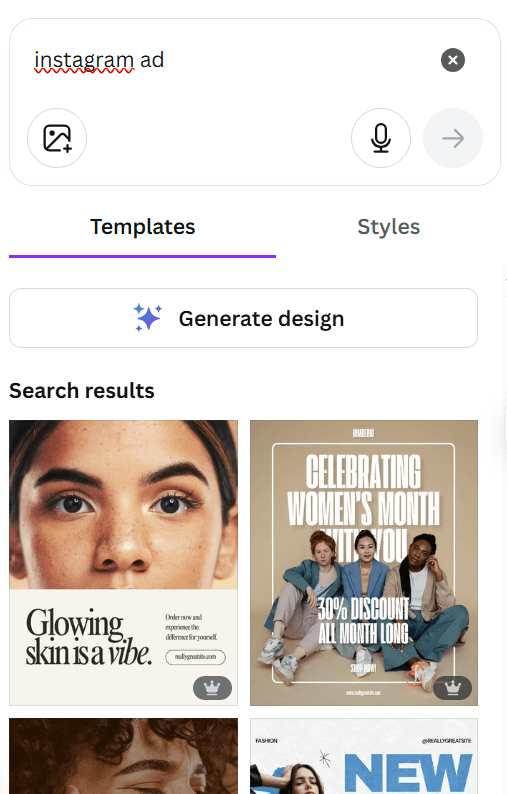
3. Use Canva Templates or Purchased Templates
Many companies and designers offer ad templates specifically for book advertising. Canva has hundreds of free templates you can customize. I don't recommend spending money on template packages, but some people find them helpful.
4. Trust Your Gut and Create From Scratch
This might sound scary, but it's not as hard as you think. Start with these elements:
- An eye-catching image of a scene or character from your book
- A compelling hook or quote from your best reviews
- Clear call-to-action (CTA) like "Read Now" or "Get Your Copy"
- Social proof signals like star ratings, review counts, or "Amazon Bestseller" badges
The best ads tell a story in a single image. Think about what emotion or question your book evokes, and try to capture that visually. A mysterious shadow for a thriller, a couple's silhouette for romance, or an epic landscape for fantasy.
Part 2: Actually Building the Ad
Once you have your concept, you need to turn it into a polished image or video. Here are your best options:
Recommended: Canva
Canva is one of the simpler yet powerful options for creating ads. It has:
- Drag-and-drop interface (no design experience needed)
- Thousands of templates specifically for social media ads
- Built-in stock photos, fonts, and design elements
- Free plan available (though Pro is worth it for authors)
Other Options:
- Figma: More advanced, better for designers
- Adobe Photoshop or Illustrator: Professional tools with steep learning curves
Step 2: Add Your Ad to a Facebook Campaign
Facebook can feel confusing with all its options and settings. Here's the key: don't overthink it.
Many "experts" will try to sell you courses with long explanations of fancy campaign structures, special audience setups, and "secret" bidding strategies.
Facebook has so many options that it's easy to think there's some silver bullet setting that will unlock massive profits. But the truth is, Facebook's base Advantage+ campaigns are really effective for authors running traffic to Amazon.
You don't need hacks or fancy techniques, at least not when you're starting out.
Super Simple Steps to Set Up Your Campaign
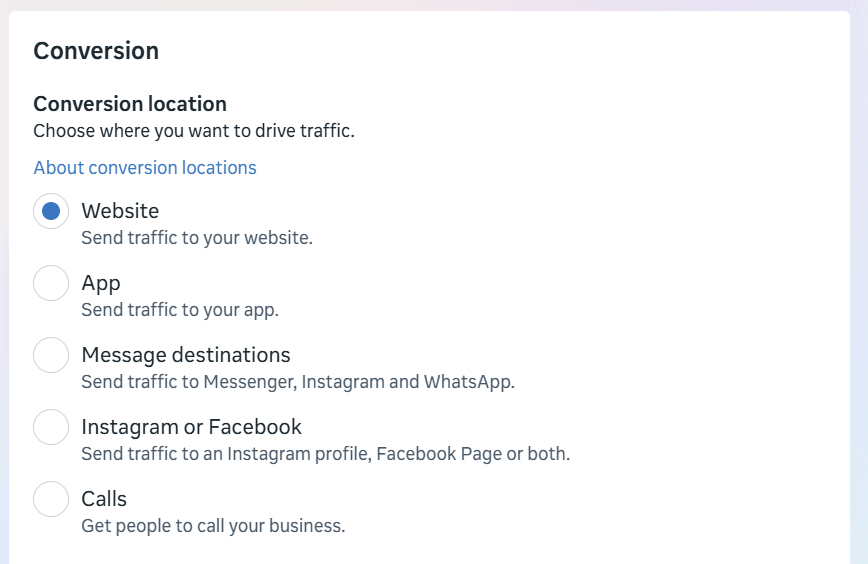
- Choose your campaign objective: Traffic. For KDP authors selling their books on Amazon, this is really the only option.
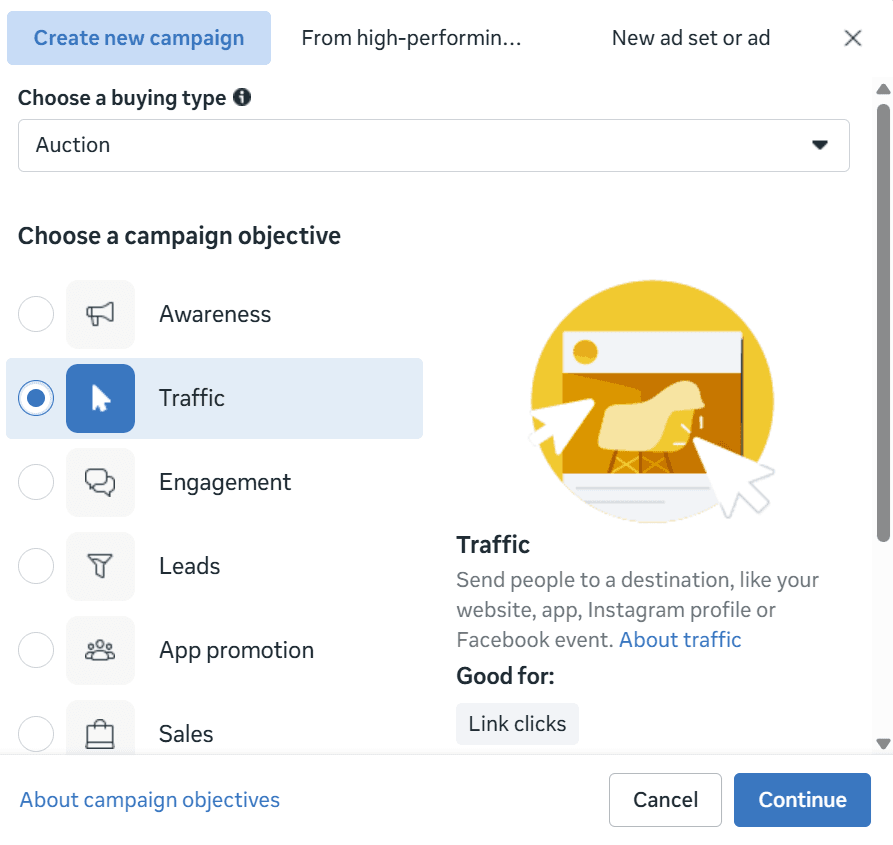
- Follow Meta's prompts: Facebook will guide you through the setup
- Use Advantage+ Shopping Campaigns: Let Facebook's AI do the heavy lifting with audience targeting
- Keep it simple: One adset for testing
Campaign Structure for Testing:
When testing new creative, create a simple structure:
- Campaign: Testing Campaign with $10 budget
- Ad Set: Use a broad audiences, it's ok to set age and gender suggestions
- Ad: Your single creative to test
Once you find winners, you can create a separate "Winners" or "Scale" campaign where you give successful ads a larger budget.
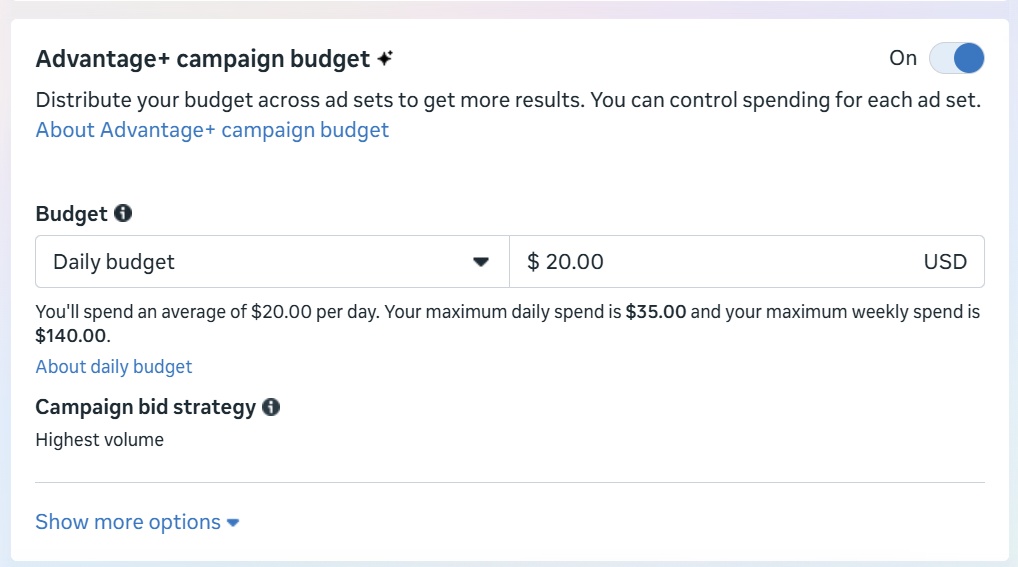
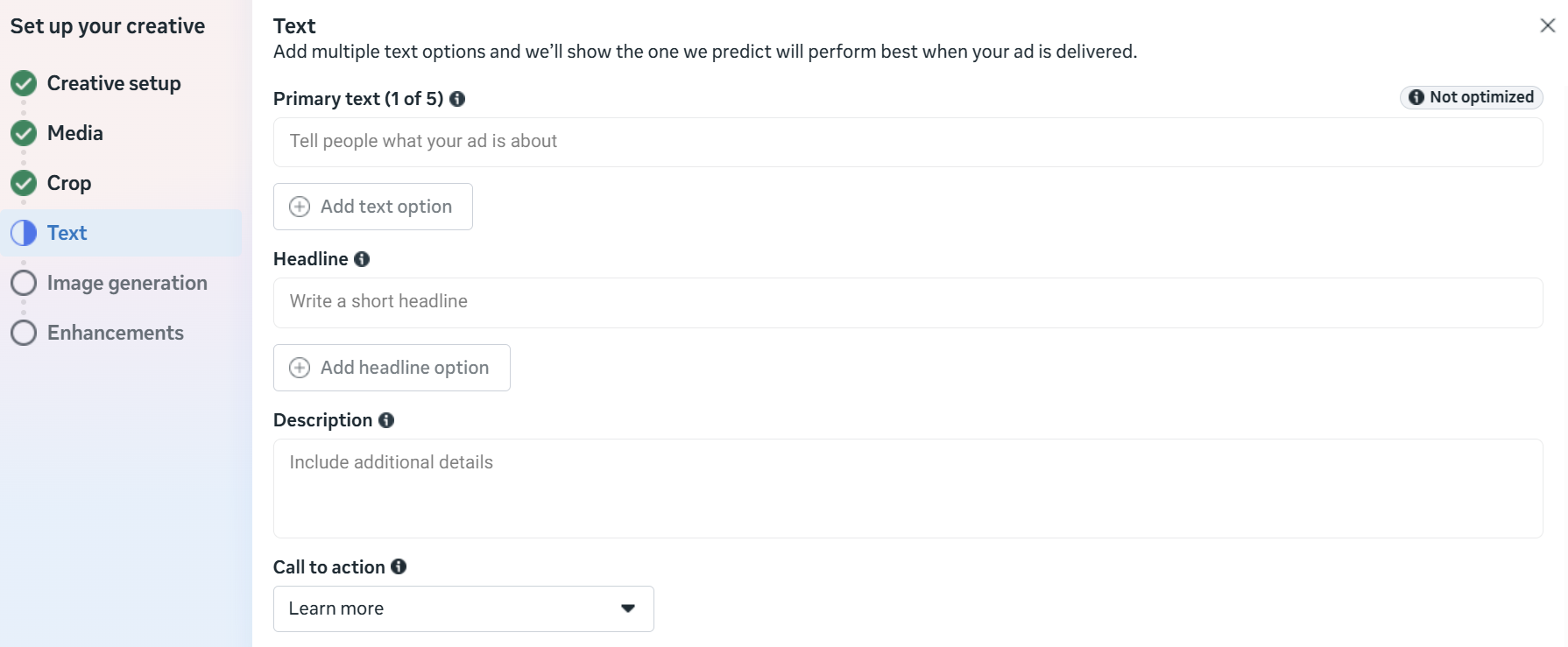
The most important thing? Getting your ads live and gathering data. Perfect campaign structure means nothing if you never launch.
Step 3: Create a Unique Amazon Attribution Link for Each Ad
This step is critical and often overlooked. You need a free Amazon Ads account to access the Amazon Attribution tool.
For each ad you run, create a separate Amazon Attribution link. This is the link you'll provide to Facebook when it asks where clicks should go.
What is Amazon Attribution?
Amazon Attribution links track all purchases, not just your advertised book, but ANY of your books that reader purchases, for 14 days after clicking your ad. This means if someone clicks your ad and buys your entire series, you get credit for all of it.
This tracking is how you'll calculate your true Return on Ad Spend (ROAS).
Why Unique Links Matter
When you create a separate attribution link for each ad, you can see exactly which creative is driving sales. If Ad A generates $50 in royalties and Ad B generates $10, you know which one to scale.
Important: Name your attribution links descriptively so you can match them to your Facebook ads later. I use the format:
YYYY_MM_DD_descriptive_ad_name
For example: 2025_10_28_mystery_couple_silhouette
Need help setting up attribution links? Check out our detailed guide on which Amazon Attribution link to use.
Step 4: Turn Off the Ad After $5-$20 in Spend
Once your ad is live, let it run until it spends your testing budget. I typically use:
- Conservative: $5-10 per test ad (lowest budget, but not the most accurate)
- Moderate: $20 per test ad
- Aggressive: $50 per test ad ($50 is showing your ad to ~5,000 people, that's plenty to get a good signal if it's working)
Choose based on your comfort level and budget. Even $5 will give you signal on whether an ad has potential.
After the ad hits your spend limit, turn it off and wait. This is where patience pays off.
Step 5: Wait Two Weeks for Attribution Window to Close
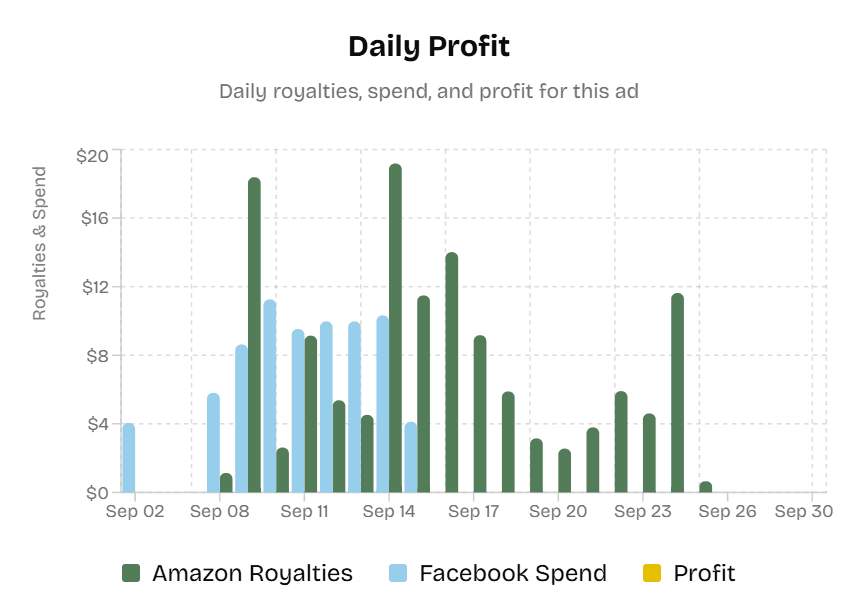
Here's the crucial part many advertisers miss: Amazon Attribution tracks purchases for 14 days after someone clicks your ad.
This means if someone clicks your ad, browses Amazon, adds your book to their wishlist, and finally buys it 13 days later, that sale still counts toward your ad's performance.
The 14-Day Attribution Window
This is actually amazing for authors. Books aren't impulse purchases for everyone. Many readers:
- Add books to their cart and purchase later
- Buy multiple books in your series over time
- Share your book with friends who also purchase
All of these sales within 14 days get attributed to your ad, making books more profitable to advertise than many people realize.
During this waiting period, resist the urge to make decisions. Your data isn't complete yet. Use this time to create more test ads or work on your next book.
Step 6: Combine Facebook Spend Data with Amazon Royalty Data
After two weeks, it's time to see if your ad made money. You need two numbers:
- Total Spend: How much the ad cost (from Facebook Ads Manager)
- Total Royalties: Revenue generated from the attribution link (from Amazon Attribution)
The Old Way (Manual Tracking)
You can track this in a spreadsheet:
- Log into Facebook Ads Manager and note your ad spend
- Log into Amazon Attribution and download the royalty data (or copy the numbers)
- Create spreadsheet formulas to calculate ROAS and profit
- Manually update this for each ad and time period
This works, but it's time-consuming and error-prone. Plus, you need to build out the formulas yourself and maintain the spreadsheet.
The Easy Way (AdSync)
The AdSync workflow for author advertising brings the reporting and campaign-review steps together. Review the royalty assumptions and allow time for Amazon results to arrive before acting on an early estimate.
At AdSync, we've made this step really easy. Our platform:
- Automatically pulls your Facebook spend data
- Automatically pulls your Amazon royalty data
- Combines them in one dashboard
- Calculates all key metrics (ROAS, profit, ROI, etc.)
- Provides charts and visualizations to spot trends
- Updates daily so you don't have to wait
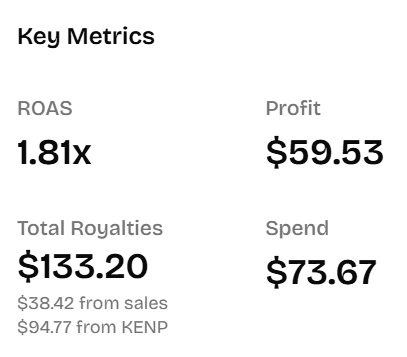
Either way works. The important thing is having a system to compare spend versus revenue for each ad.
Step 7: Scale Winning Ads and Keep Testing
Now for the exciting part: evaluating your results and scaling winners.
Look at your ROAS (Return on Ad Spend) for each ad. Here's how to interpret your results:
Keep the sales and royalty definitions below separate when comparing reports.
Understanding ROAS (Return on Ad Spend)
This example uses estimated royalties, rather than retail sales, in the numerator:
Royalty return multiple = Attributed Estimated Royalties ÷ Total Ad Spend
For example:
- You spent $20 on an ad
- It generated $30 in royalties
- Royalty return = $30 ÷ $20 = 1.5x
What's a Good ROAS?
- Below 1.0x: Reported estimated royalties have not covered ad spend. Check reporting maturity and your test budget before deciding what to do next.
- At 1.0x: Estimated royalties cover ad spend only, before other costs.
- Above 1.0x: Estimated royalties exceed ad spend. Check your cost assumptions, data maturity and consistency before scaling.
These thresholds apply to the royalty-based calculation above. Sales-based ROAS uses retail sales instead, so its break-even point depends on the royalty margin.
Keep in mind that KDP authors often have additional benefits beyond immediate royalties. For me, these benefits mean it's worth it to run ads that are at only barely over 1.0x ROAS.
- You get more reviews
- People may have bought your book after seeing, but not clicking on, your ad
- I estimate ~10% of book sales happen outside of the 14 day window, so the stated royalties are probably a little low.
Those possibilities are not measured earnings in this calculation. A 1.2x royalty return leaves a small contribution after ad spend, before other costs; do not automatically add unobserved benefits to it.
What to Do With Winners
When an ad shows a sustained positive contribution after the costs you include, and enough reporting time has passed to judge it:
- Duplicate it to a "Winners" campaign: Create a separate campaign for proven ads
- Give it a larger budget: $10-50/day depending on your goals
- Monitor it regularly: Even winning ads can fatigue over time
- Create variations: If a character image works, try a different stock image with the same concept
Keep Testing Forever
Even when you have winning ads, continue testing new creative regularly. Ad fatigue is real—audiences get tired of seeing the same ad. Having a pipeline of tested creative ensures you always have fresh ads to rotate in.
What to Do With Losers
For ads below 1.0x ROAS:
- Turn them off and don't give them more budget
- Analyze why they failed: Was the image unclear? Was the hook weak? Wrong genre signals?
- Use these insights to inform your next round of testing
- Save the creative. You can test it again in 6 months with a different audience or timing
The Testing Mindset
Professional advertisers expect most ads to fail or break even. Finding 1-2 winners out of every 10 tests is normal and profitable. Don't get discouraged by ads that don't work, that's just part of the process.
Every "failed" ad teaches you something about what resonates with your audience.
Bringing It All Together
Let's recap the simple process for running profitable Facebook ads as a KDP author:
- Create 5-10 ad creative concepts using templates, inspiration from successful authors, or your own ideas
- Set up simple Facebook campaigns using Advantage+ and following Meta's recommendations
- Create unique Amazon Attribution links for each ad so you can track performance
- Test each ad with a small budget ($5-50 depending on your comfort level)
- Wait two weeks for the full attribution window to complete
- Combine your data from Facebook (spend) and Amazon (royalties) to calculate ROAS
- Scale ads with 1.2x+ ROAS to a dedicated winners campaign and keep testing new creative
This process works because it's based on data, not guesswork. You're letting your audience tell you what works rather than assuming you know best.
Remember: The ad creative is what matters most. Campaign structure, advanced targeting, and fancy techniques only matter once you have creative that resonates with your audience.
Focus on creating compelling ads that stop the scroll, and the rest will follow.
Ready to Start Testing Your Ads?
Running Facebook ads doesn't have to be complicated or expensive. Start with a small testing budget, create a handful of ads based on successful concepts in your genre, and let the data guide you.
The authors who succeed with Facebook ads aren't the ones with the biggest budgets or the fanciest strategies. They're the ones who consistently test new creative, track their results accurately, and scale what works.
You can do this.