5 Critical Tips for Setting Up Amazon Attribution Links
Did you know what clickthrough link you use can impact your Amazon Attribution results? Avoid these common pitfalls.
What is an Amazon Attribution Link?
Amazon's attribution feature has unlocked a whole new world of advertising for KDP authors and Amazon sellers since its release in 2022.
So what's the big deal? Now you can create a Facebook ad (or other ad platforms) with a link that goes directly to Amazon, and Amazon will TELL YOU how much money was made from users clicking on your ad. No more guessing. Now you can calculate ROI and take ads seriously.
Chomping at the bit to use this tool? Hold your horses. There are some critical mistakes you can make (trust me, this article is written from firsthand experience) when setting up Amazon attribution that will ruin your ad results before you even get started. Read on to learn from my experience.
Once your links are set up, review attribution alongside Meta spend so clicks and sales have the cost context you need. The author advertising overview explains how that fits into a regular campaign review.
The attribution feature, officially still in beta after 3 years, allows you to track sales of selected products to users who click on a generated link (this link is called the "Attribution Tag" in Amazon). There are several nuances in what sales are tracked and how they're associated with your ads. The intricacies of attribution methodology, which differ from platform to platform, are for a whole other article. I'll link it here when I get to writing it.
Attribution is the tracking of which sales are attributed to which ads. It's a core principle of all marketing disciplines.
I mention Facebook as it is the most popular advertising platform for authors, but Amazon Attribution works anywhere on the internet.
You can try Reddit ads, TikTok, add it to your newsletter, advertise on BookBub, etc.
What is a Clickthrough Link?
It's crucial you know two links go into every Amazon Attribution link:
-
The Attribution Link is the link that you will share in ads, with your audience, etc. It is specifically set up with tracking.
-
The Clickthrough Link is the link to the page you actually want to advertise. Amazon adds its tracking parameters to this link to create the attribution link.
Your job is to provide Amazon with the clickthrough link, and they will return the tracking link to you.
While Amazon makes this look really simple, there are some key considerations when you provide them the clickthrough link that you may not have considered that will impact the accuracy of Amazon reporting and the success of your ads.
How to Create An Amazon Attribution Link
Before I get into the specifics of which clickthrough links work best, here's a quick reminder on how to create an attribution link. If you've done this before, feel free to skip ahead. If you haven't, check out our detailed guide on setting up Amazon Attribution, which covers every detail of link setup.
Select Products for Your Campaign
Log in to Amazon Ads and navigate to the Attribution Console. From there, select your campaign (or create a new one). On the product tab, choose the products you want to track. I strongly recommend adding EVERYTHING you sell. I'll add an article on why series and high customer lifetime value matter later.
Name Your Ad Group
Go to the ad group tab and select "New Ad Group".

Important note: You might think "Ad Group" refers to a group of ads.
WRONG! Amazon is tricking you. You should treat an "Ad Group" as an individual external ad.
Even more confusing is that in Amazon Sponsored Ads (ads on Amazon), "Ad Group" actually refers to a group of ads, similar to a Facebook ad set. The wording within the attribution feature is poorly done.
Select Publisher/Channel
First, name your ad group.
I almost guarantee you'll hate your first naming system. It's a rite of passage.
Here's the format I'm currently using:
DD_MM_YY_descriptivenameofadcreative
Sometimes I add a prefix indicating the campaign:
winner_DD_MM_YY_descriptivenameofadcreative (if I've added a test ad to a dedicated scale campaign)
Just pick something simple, descriptive, and easily recreated for all of your ads (you want them all in standard format).
Then add your publisher and channel.
Provide Your Clickthrough Link
Here's where the rest of this article comes in handy. You need to provide the Amazon URL where you want to send traffic. This is the critical step that determines whether your attribution will work properly.
Not all clickthrough links are created equal!
Let's get into it.
What Clickthrough Link to Use
I think it's a crazy oversight, but Amazon doesn't provide ANY guidance on what format link to use in the console. Look at how generic this is:

What I'm sharing here are things I learned the hard way, or only discovered because I've read every word of the Amazon Attribution API developer documentation twice (say that five times fast).
Yes, coffee was involved (we had recently bought a Nespresso machine, which a savvier me would add an affiliate link to here).
Important Disclaimer
These tips vary in the extent to which Amazon has officially confirmed them, but I've tested them extensively and found that they do impact reporting accuracy. Your mileage may vary, but I recommend treating these as best practices to be on the safe side (it can't hurt to be MORE thorough).
Here are my five tips on what clickthrough link to use:
Tip #1 - Use Product Detail Page Links, But the New Format!
While the Amazon Ads website is not particularly helpful in determining which link to use, the developer documentation is much more useful.
Here's the most explicit thing Amazon says:
"Attribution tags can be implemented in any manner that results in a valid URL that is called when the ad is clicked, as long as the landing page is an Amazon Store or Product Detail Page."
Now we're cooking with fire! So what's a product detail page?
It's the specific Amazon page for your book that displays all the details, including cover, description, reviews, pricing for different formats, and more.
This is just the page you think of when looking at an Amazon product.
The catch is that two different link formats will link to a product detail page: /dp/ and /gp/product/.
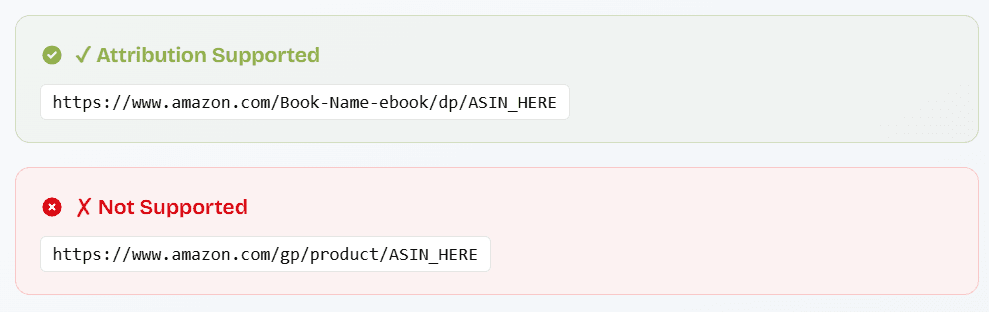
Both will link to the page and let you buy a book, but:
-
/dp/is the new format and is what Amazon references in their documentation. -
When I've used
/gp/product/, I've noticed significantly reduced performance in the following metrics:
- Number of Facebook Clicks that turn into Amazon Click throughs
- Number of Amazon Clickthroughs that turn into Detail Page Views
I'm led to believe that using the /gp/product/ format may interfere with Amazon Attribution. Regardless, it should be a best practice to use the new /dp/ format.
In the Amazon documents (here's the link), they use /dp/ as the example link:
https://www.amazon.com/AmazonBasics-Performance-Alkaline-Batteries-Count/dp/B00MNV8E0C
For your book, it should look something like:
https://www.amazon.com/Your-Book-Title-Author-Name/dp/B08XXXXXXX
/gp/product/ links are still used for public profiles and other pages. They have their use, so that's why they still exist.
I'm not sure how I got a /gp/product/ link in the first place, but I had 5+ of them in my attribution tags before I learned about this.
Tip #2 - Store Page Links Are Also Acceptable (But Not Ideal)
Amazon also allows store page links. These are pages that showcase multiple products from a brand or author. Your author page on Amazon would be an example of this.
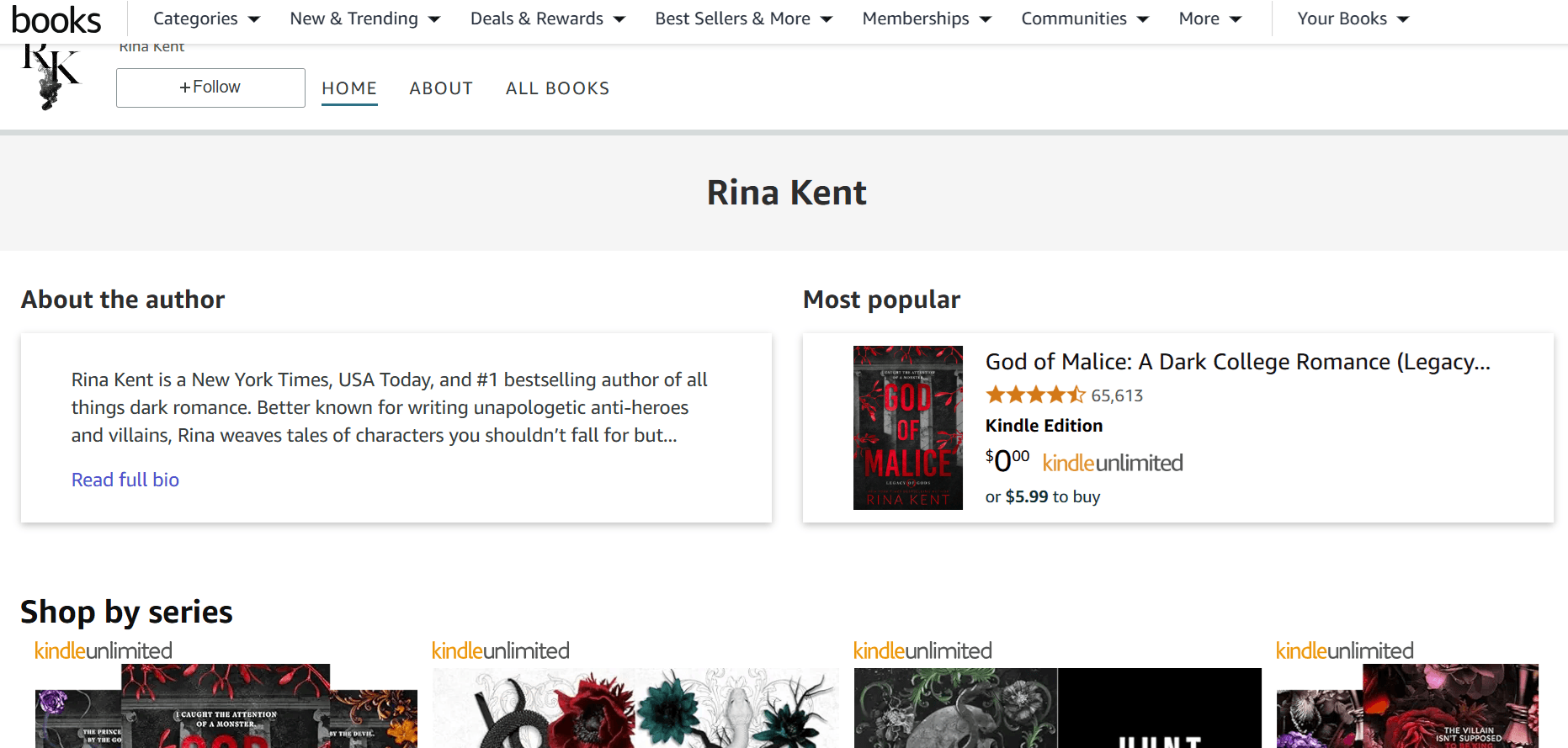
However, I don't recommend this approach. Here's why:
Store pages have lower conversion rates. When someone clicks your ad, they're interested in the specific book you advertised. If they land on a page with multiple books, they might get overwhelmed or distracted.
If you do want to use store pages (maybe you're promoting your entire series), make sure the URL contains /stores/ like this:
https://www.amazon.com/stores/Author-Name/page/XXXXXXXXX
Stick with detailed product pages unless you have a specific reason to use store pages.
Tip #3 - Make Sure There Aren't Other URL Parameters in the Clickthrough Link
This one's technical but super important. Let me explain what URL parameters are and why they can cause issues with your attribution.
What's a URL parameter? These are the bits that come after the ? in a URL. They look like ?utm_source=facebook&utm_campaign=book_launch. They're used to pass information about where traffic came from.
These are used way more often than you think, and they're what cause really long URLs.
And here's what an Amazon Attribution link looks like with its own parameters:
https://www.amazon.com/dp/B08XXXXXXX?maas=maas_adg_XXXXXXXX&ref_=aa_maas&tag=AdSync-20
But get this, if you mix them, they can interfere with each other.
Your attribution tracking might break, leading you to think ads aren't working, when it's not your creative or Facebook's fault, but rather a tracking problem.
By the way, the best way to check this is to look if Amazon clickthroughs are showing up at all in reporting. You can see this in the Amazon console, or we make it very easy to find in AdSync analytics.
Amazon is very explicit about this in their documentation:
Important Warning from Amazon
"Remove any pre-existing ref_ or tag parameters from the clickthrough URL so they do not interfere with Amazon Attribution's ref_ and tag parameters. If two parameters with the same name are included in the URL, measurement will not be accurate."
They also mention this in their troubleshooting section:
"You altered the tag in a way that interfered with its functionality, such as removing a parameter, or you appended it to a URL without following standard URL formatting rules. A valid URL format will contain (in order): an Amazon domain, a path to a product or stores page, a ? character, and then a list of parameter name=value pairs, each separated by an & character."
This indicates that even if you're using other parameters not explicitly forbidden by Amazon, if your advertising platform appends them in a different order, it may interfere with Amazon Attribution.
Ensure your URL begins with a clean Amazon product URL, without any existing parameters.
Tip #4 - Make Sure the Clickthrough Link Matches Your Marketplace
This is another surprising one that is not mentioned anywhere, has cost me money, and I still wouldn't know about the issue to this day if it weren't for random luck having led me to stumble upon it.
If you're using an Amazon Ads USA profile, and you link to a foreign Amazon page, Amazon Attribution won't work!
Here's what I mean:
Why does this happen? Sometimes, when you're searching for your book to get the link, you might accidentally end up on the wrong Amazon marketplace.
How to avoid this:
-
Double-check the domain in your URL (
.comfor USA,.co.ukfor UK,.cafor Canada, etc.) -
Make sure your Amazon Ads profile matches the marketplace you're linking to
-
Test your attribution link before launching your campaign
This is especially important if you're advertising in multiple countries. You'll need separate attribution campaigns for each marketplace.
Tip #5 - Make Sure You Link to the Product Format You Want to Sell
This is a subtle but essential point; ebook vs. paperback vs. audiobook matters.
It does change how the Amazon page displays, and that first impression can significantly impact your conversion rate.
Here's what happens: When someone lands on your Amazon page, the format you linked to will be the default selection.
Prices will be different. Best Seller tags will be different. What is displayed on the product page will be different.
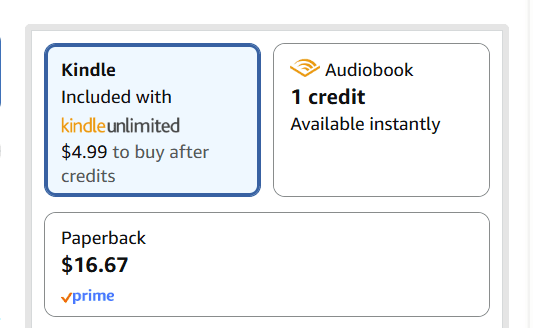
You won't believe this, but as I was taking that screenshot, I tested switching between the formats. When I switch to Audible format, Amazon appended this /ref=tmm_kin_swatch_0 to the link.
Guess what? That will break my attribution tracking.
As mentioned earlier, Amazon states that ref tags are not permitted. It just goes to show how easy it is to end up with a bad clickthrough link.
Back to book formats. You can measure your Amazon landing page's effectiveness by looking at how much revenue each Detail Page View (DPV) generates. This is influenced by both the format you're promoting and the quality of audience your external ad brings in.
Pro Tip: Track Your DPV Performance
In your AdSync dashboard, look at your "Revenue per DPV" metric. If it's lower than expected, try linking to a different format or adjusting your ad targeting to attract more qualified traffic.
Quick Recap: Getting Your Clickthrough Links Right
Amazon Attribution has been a game-changer for KDP authors, but like most Amazon tools, the devil is in the details.
And they're not very helpful in providing those details.
The clickthrough link you choose can make the difference between accurate tracking and missed sales data.
Here's your cheat sheet for choosing the correct clickthrough link:
DO Use:
-
Detailed product page URLs with
/dp/in the path -
Clean URLs without existing parameters
-
The specific product format you want to promote
DON'T Use:
-
URLs with existing UTM or ref parameters
-
Links to the wrong Amazon marketplace
-
Generic author store pages (unless promoting multiple books)
The bottom line? Amazon Attribution is powerful, but it requires precision. Take the extra few minutes to get your clickthrough links right, and you'll have much more reliable data to optimize your campaigns.
Remember: accurate attribution data is the foundation of profitable advertising. When you know exactly which ads are driving sales, you can double down on what works and cut what doesn't.