How to Create a Facebook Ad Campaign for Authors
From the ads manager, find the "Create" button. We'll walk through all of the options as you set up your campaign.
Buying Type
Always use Auction.
Campaign Objectives
The point of a campaign is to group ads around a central objective. There are many options on Facebook:
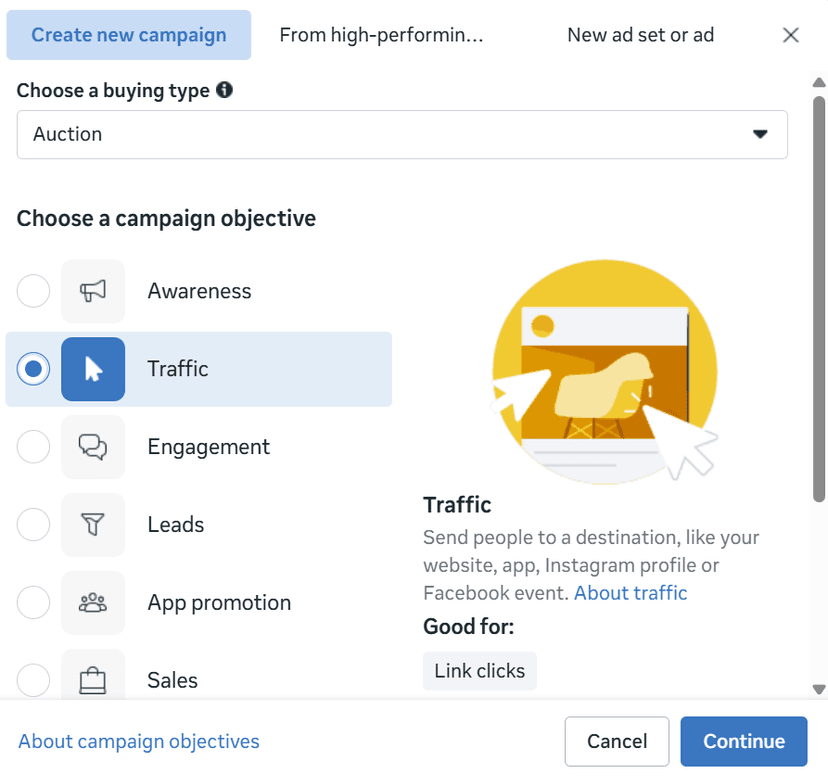
- Awareness: Maximizing how many people see your ad.
- Traffic: Clicks on a link you provide, or traffic to a website.
- Engagement: Comments on your posts, followers on your page.
- Leads: Getting people to submit a form or email address.
- App promotion: Downloads of an app.
- Sales: Online purchases via a cart on your website.
I wouldn't really recommend awareness and I'm assuming you don't have an app to download. You could use ads to build your email list on your website using a Leads campaign, but I won't discuss that much further here.
This leaves us with Sales, Traffic, and Engagement.
Engagement Campaign Objective
I think it's a viable strategy to pay for followers using an Engagement campaign if you're just starting out.
However, I'd only recommend this if you're fully committed to using social media as a strategy and are producing lots of organic content. Then you can just use your existing content as the ad, and run budget behind it to build up an audience. It's not particularly cost-effective. I'd expect $0.25 to $3.00 per follower.
Sales vs. Traffic Campaign Objectives
Now we have to discuss a nuance between sales and traffic. Most authors are here to sell books. But for the sake of Facebook ads, these two objectives are both selling books.
If you have a website with Shopify or some commerce integration, you can use the Sales objective.
- Have users checkout directly on your domain
- Control the code and install the Facebook Pixel
You absolutely must install the Facebook Pixel so that Facebook can see what sales are actually happening on your website. Without this, you won't know if your ads are working and if they are worth your time and ad spend.
But what if you sell your books on Amazon? Even if you have a website, Amazon may be your preferred sales spot (no fulfillment to worry about). All of the things I said hold true: you absolutely MUST know if your ads are generating money.
However, you can use a Traffic campaign and achieve this.
With a traffic campaign, Facebook will optimize for the maximum number of link clicks to the link you provide. This is where you will provide an Amazon Attribution link, so you can see how many royalties Facebook users who click on your link are driving. You can learn more about Amazon Attribution in our Amazon Attribution Guide but we'll cover the minimum you need to know when we get to setting up the ad.
Recap for campaign objectives:
- Traffic campaign if you sell on Amazon
- Sales campaign if you sell on your website
- You will rarely use all other campaign types
Campaign Setup: Manual vs. Advantage+
When you select an objective, you'll be asked on which setup style to proceed with.
For many authors, choosing the recommended settings is a good idea. This is synonymous with choosing an Advantage+ campaign. Then you can change a few of the options away from the advantage+ default when you get there.
If you do choose the recommended setup, you'll lose some options from a manual setup like the ability to retarget existing users or run carousel ads, but these are quite advanced settings you don't need to worry about when you're just getting started.
It is also important to note that if you create an Advantage+ campaign, you will not be able to copy ads into a manual campaign in the future.
As of January 2026, I actually use manual campaigns. This is new to me. My approach now is to use the manual campaign, but use Advantage+ settings almost everywhere I can. I use Advantage+ interest targeting and Advantage+ placements. But I needed control over the gender when setting up targeting in my adset. You see if you create an Advantage+ campaign, the ages and genders you choose in the adset are merely suggestions. I primarily run ads for romance books and need to ensure my books are shown to women.
Facebook will show your ads to categories that perform better. This is why it does not matter to most authors, unless you are targeting a specific gender. I would HIGHLY advise you not to choose a manual campaign if you are wanting to only restrict the age. You'd be surprised at how well seemingly non-target age groups will perform.But even though Facebook could get low cost clicks from Men and Women in my ads, the men are less likely to buy once they are on the Amazon page. Hence, why I switched over.
When to use Advantage+ vs. Manual:
- Choose Advantage+ if you're just starting out and want Facebook's AI to handle most optimization. Best for authors without strict targeting requirements.
- Choose Manual if you need strict control over gender targeting (e.g., romance books for women only) or want access to advanced features like retargeting and carousel ads.
- Pro tip: You can use Manual campaigns with Advantage+ settings enabled for specific features (placements, interests) to get the best of both worlds.
Campaign Naming
You can use campaigns to help organize yourself. The most common use of campaigns is to divide up products. For authors, this means one campaign per book series.
However, this isn't necessarily a requirement. You could have one campaign for all of your books and have different ad sets for each book series. That would require ad set level budgets.
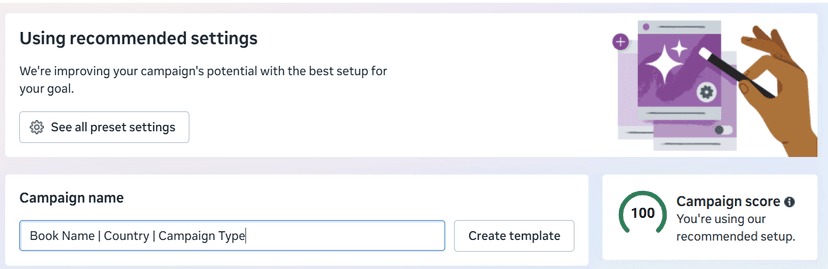
I recommend adding the objective type to your campaign name. If you divide them for each book, include that. Many people use separate campaigns for testing and scaling ads, so this is how you'd distinguish that as well.
Campaign Budget
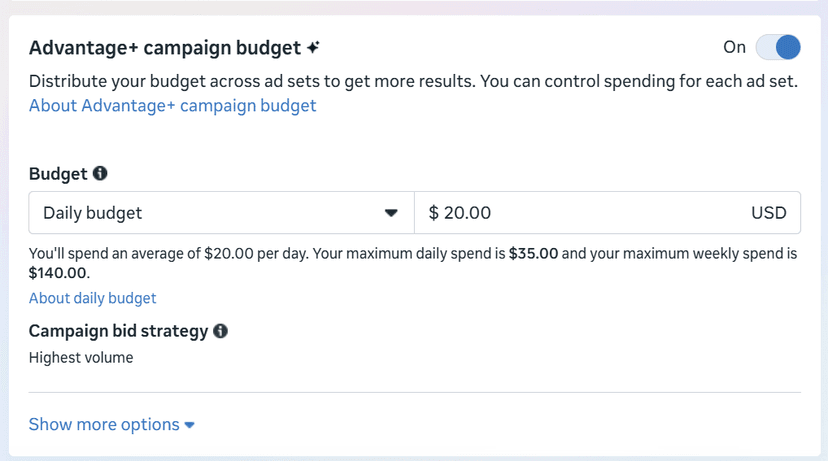
Next, select campaign or ad set budget. Again, I recommend using the ad set budget. You may have to find the "show more options" dropdown to find this.
There are two major reasons I like budgets at the ad set level:
- It enables finer control on which ad gets the budget.
- It makes scaling easier.
At lower spend levels, Facebook will only spend budget on 1 ad per ad set. This means if you have multiple ad sets and a campaign budget, your whole campaign might just spend budget on 1 ad. We will cover this more later.
When you set budget at the campaign level, a change to the budget will impact all of your ad sets and ads and may cause them to reset and have to start over in the Facebook algorithm. This means your ads will be less stable. You will begin to fear making changes, which is not good for testing and learning as you get started.
And at some point in time you will make a change, it will ruin an ad that was already wildly successful, and then you will swear off campaign budget in a fit of rage and move over to ad set budget anyways. We will discuss this reason more in both the learning phase and scaling lessons.
You can change this later (with a little fiddling).
Final Settings
- Leave "A/B testing" off.
- Add any Special Ad Categories you represent (should be none for most authors).